-
Kernel
-
Plugins
-
Release Notes
| This chapter may be skipped at first time of using the system. |
The BGERP system is primarily a platform, so significant benefits from its use are achieved through the implementation of various extensions tailored to customer needs.
Choose technology CCC
The application provides several levels for extending or modifying the standard logic. The methods are listed in order of increasing complexity and functionality. The recommended practice is to move from simple to more complex.
Config
Very many things in our product can be changed using configurations, which are well-documented and stable after version updates. Use JEXL scripts for more flexibility.
Custom
Develop own Custom plugins using Java, JSP and full-featured IDE.
Config
Pattern
Conditional pattern allows substitutions text before ${key} text after of ${key} with different values, like in many other different template engines. Specifically for our product the pattern supports conditional substitutions like text before (optional text before ${key} optional text after) text after, where the whole optional text before ${key} optional text after part has been added only when value of ${key} is not blank.
JEXL
JEXL - short expression’s language.
It’s used to write conditional expression macros in the configuration and perform flexible evaluation of small strings. In addition to the operators described below in this section, the language supports calling Java methods of the passed objects.
Cheat Sheets:
-
operator [] - creates List, {} - Set;
-
function new - creates object of class, the name of it passed as the first parameter;
-
operators for checking presence values in collections: =~ , !~;
-
expression can be multiline, the result if exists, passed with operator return.
References:
In JEXL processor always passed the variables:
-
u - static context of class ru.bgcrm.util.Utils - for static methods calls;
-
tu - static context of class ru.bgcrm.util.TimeUtils - for static methods calls;
-
tc - static context of class org.bgerp.util.TimeConvert - for static methods calls;
-
su - static context of class org.apache.commons.lang3.StringUtils - for static methods calls;
-
сu - static context of class org.apache.commons.collections.CollectionUtils - for static methods calls;
-
fu - object of class org.apache.commons.io.FileUtils for calling static methods;
-
log - object of class org.bgerp.util.Log, allows debugging using log.debug and other calls;
-
NEW_LINE - line break;
-
NEW_LINE2 - two line breaks.
Depending on enabled plugins passed the following variables:
-
bgbilling - object of class ru.bgcrm.plugin.bgbilling.ExpressionObject
-
email - object of class org.bgerp.plugin.msg.email.ExpressionObject
-
max - object of class org.bgerp.plugin.msg.max.ExpressionObject
-
mobile - object of class ru.bgcrm.plugin.mobile.ExpressionObject
-
secret - object of class org.bgerp.plugin.sec.secret.ExpressionObject
-
sms - object of class org.bgerp.plugin.msg.sms.ExpressionObject
-
task - object of class ru.bgcrm.plugin.task.ExpressionObject
-
telegram - object of class org.bgerp.plugin.telegram.ExpressionObject
Standard Process Context
Is widely used in the system for customization logic around processes. Additionally to all the variables above has the following:
-
object of class org.bgerp.dao.expression.ProcessChangeExpressionObject is passed as the default function context, all of its functions can be called in a script without the dot prefix;
-
up or userParam - object of class org.bgerp.dao.expression.ParamExpressionObject, his parameters;
-
p or process - object of class ru.bgcrm.model.process.Process, the processed process;
-
pp or processParam - object of class org.bgerp.dao.expression.ParamExpressionObject, its parameters;
-
pl or processLink - object of class org.bgerp.dao.expression.ProcessLinkExpressionObject, its links;
-
user - object of class ru.bgcrm.model.user.User, the user;
-
ui - object of class org.bgerp.dao.expression.UiExpressionObject, UI calls for the user session;
-
form - object of class ru.bgcrm.struts.form.DynActionForm, the HTTP request;
-
conSet - object of class ru.bgcrm.util.sql.ConnectionSet, DB connections.
These variables provide access to the global system directories:
-
ctxSetup - org.bgerp.app.cfg.Setup;
-
ctxUserList - List of all ru.bgcrm.model.user.User;
-
ctxUserMap - Map with Integer keys, containing ru.bgcrm.model.user.User;
-
ctxUserGroupList - List of all ru.bgcrm.model.user.Group;
-
ctxUserGroupMap - Map with Integer keys, containing ru.bgcrm.model.user.Group.
Java REGEXP
Regular expressions allow flexible description of string patterns. That’s implemented by substituting certain macros that denote parts of a string or characters of a certain type.
For example:
-
(342) is the characters 342 following one another;
-
3\d2 is 3 followed by any digit and 2;
-
342)|(559 is the sequence of characters 342 or 559;
-
44[2-8] is the strings 442, 443, 444, 445, 446, 447, 448.
Expanding some macros:
-
a-b - this position can contain a character from a to b (in the character table);
-
[abc] - this position can contain any of the characters a, b, or c;
-
abc - a sequential order of the characters a, b, c;
-
abc)|(def - abc or def appear in this position; () is a group of characters.
Logging
The application uses the Log4j library with configuration in log4j.properties file, which can be modified while the application is running. This is what the file looks like after the system installation:
// PzdcDoc snippet of: 'log4j.properties', lines: 1 - 92

# factory for making loggers out of the configuration with additivity=false
log4j.loggerFactory=org.bgerp.util.log.LoggerFactory

# libraries logging
log4j.rootLogger=WARN, file, session

# prevent messages "Invalid chunk starting at byte [0] and ending at byte [0] with a value of [null] ignored"
log4j.logger.org.apache.tomcat.util.http.Parameters=ERROR, file

# the application logging
# add ending ', out' appender when running inside IDE to see INFO output also in STDOUT
# or ', outa' to see all output in STDOUT
log4j.logger.ru.bgcrm=ALL, filew, file, filed, session
log4j.logger.org.bgerp=ALL, filew, file, filed, session

# only WARN messages
log4j.appender.filew=org.apache.log4j.RollingFileAppender
log4j.appender.filew.layout=org.apache.log4j.PatternLayout
log4j.appender.filew.layout.ConversionPattern=%d{MM-dd/HH:mm:ss} %5p [%t] %c{1} - %m%n
log4j.appender.filew.encoding=UTF-8
log4j.appender.filew.File=./log/bgerp.warn.log
log4j.appender.filew.Append=false
log4j.appender.filew.MaxBackupIndex=0
log4j.appender.filew.MaxFileSize=10MB
log4j.appender.filew.Threshold=WARN
log4j.appender.filew.filter.a=org.apache.log4j.varia.LevelMatchFilter
log4j.appender.filew.filter.a.LevelToMatch=WARN
log4j.appender.filew.filter.a.AcceptOnMatch=true
log4j.appender.filew.filter.b=org.apache.log4j.varia.LevelMatchFilter
log4j.appender.filew.filter.b.LevelToMatch=ERROR
log4j.appender.filew.filter.b.AcceptOnMatch=false

# INFO, WARN, ERROR messages
log4j.appender.file=org.apache.log4j.RollingFileAppender
log4j.appender.file.layout=org.apache.log4j.PatternLayout
log4j.appender.file.layout.ConversionPattern=%d{MM-dd/HH:mm:ss} %5p [%t] %c{1} - %m%n
log4j.appender.file.encoding=UTF-8
log4j.appender.file.File=./log/bgerp.log
log4j.appender.file.Append=true
log4j.appender.file.MaxBackupIndex=5
log4j.appender.file.MaxFileSize=10MB
log4j.appender.file.Threshold=INFO

# DEBUG, INFO, WARN, ERROR messages
log4j.appender.filed=org.apache.log4j.RollingFileAppender
log4j.appender.filed.layout=org.apache.log4j.PatternLayout
log4j.appender.filed.layout.ConversionPattern=%d{MM-dd/HH:mm:ss} %5p [%t] %c{1} - %m%n
log4j.appender.filed.encoding=UTF-8
log4j.appender.filed.File=./log/bgerp.debug.log
log4j.appender.filed.Append=true
log4j.appender.filed.MaxBackupIndex=5
log4j.appender.filed.MaxFileSize=10MB
log4j.appender.filed.Threshold=DEBUG

# all messages
log4j.appender.filea=org.apache.log4j.RollingFileAppender
log4j.appender.filea.layout=org.apache.log4j.PatternLayout
log4j.appender.filea.layout.ConversionPattern=%d{MM-dd/HH:mm:ss} %5p [%t] %c{1} - %m%n
log4j.appender.filea.encoding=UTF-8
log4j.appender.filea.File=./log/bgerp.all.log
log4j.appender.filea.Append=true
log4j.appender.filea.MaxBackupIndex=5
log4j.appender.filea.MaxFileSize=10MB

log4j.appender.session=org.bgerp.util.log.SessionLogAppender
log4j.appender.session.layout=org.apache.log4j.PatternLayout
log4j.appender.session.layout.ConversionPattern=%d{MM-dd/HH:mm:ss} %5p [%t] %c{1} - %m%n
log4j.appender.session.Threshold=DEBUG

# info out, for running in IDE add it after comma at the end of 13 and 14 lines
log4j.appender.out=org.apache.log4j.ConsoleAppender
log4j.appender.out.Target=System.out
log4j.appender.out.layout=org.apache.log4j.PatternLayout
log4j.appender.out.layout.ConversionPattern=%d{MM-dd/HH:mm:ss} %5p [%t] %c{1} - %m%n
log4j.appender.out.Threshold=INFO

# all stdout, for debuging in IDE connect it to newly added loggers
log4j.appender.outa=org.apache.log4j.ConsoleAppender
log4j.appender.outa.Target=System.out
log4j.appender.outa.layout=org.apache.log4j.PatternLayout
log4j.appender.outa.layout.ConversionPattern=%d{MM-dd/HH:mm:ss} %5p [%t] %c{1} - %m%n

# sent mails
log4j.logger.org.bgerp.util.mail.MailMsg=INFO, mail
log4j.appender.mail=org.apache.log4j.RollingFileAppender
log4j.appender.mail.layout=org.apache.log4j.PatternLayout
log4j.appender.mail.layout.ConversionPattern=%d{MM-dd/HH:mm:ss} %5p [%t] %c{1} - %m%n
log4j.appender.mail.encoding=UTF-8
log4j.appender.mail.File=./log/mail.log
log4j.appender.mail.Append=true
log4j.appender.mail.MaxBackupIndex=5
log4j.appender.mail.MaxFileSize=10MB
It can be adapted, e.g. for debug purposes:
By default, log files are being persisted to log directory and can be observed using App Status tool.
To get only debug messages of the current user session, use User Session Log.
Custom
Custom application code has to be placed custom directory in the project root.
Source
Java
Inside custom/src placed regular Java code, including plugins plugins. PLUGIN_ID for those has to be prefixed by custom., e.g. custom.bitel. Respectively plugin Java classes have to be stored under paths: custom/src/org/bgerp/plugin/custom/<PLUGIN_ID_AFTER_DOT>, e.g. custom/src/org/bgerp/plugin/custom/bitel.
That code has equal possibilities as the native application’s, can use API and connected libraries. After compilation Administration / Custom the bytecode is persisted to lib/app/custom.jar.
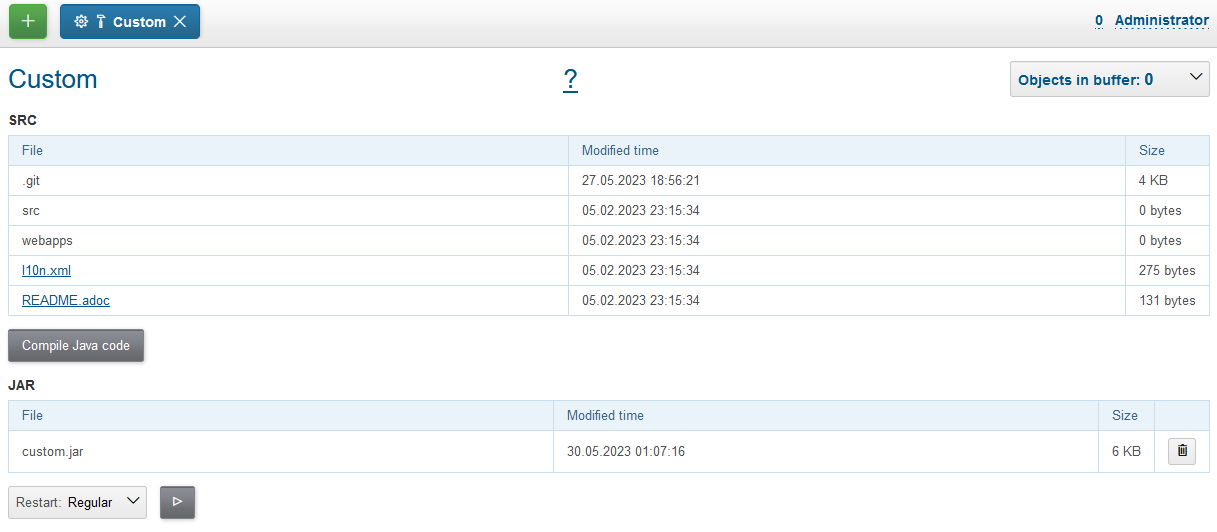
The custom plugins can named without custom. prefix and their Java code may be placed to other then org.bgerp.plugin.custom packages, but in this case the custmo classes are not dynamically reloaded after each successfull compilation. They are taken together with built-in Java classes only during the app’s startup, so there is a Restart button in Custom tool available for that.
WebApp
Subdirectory custom/webapps is searched before webapps from root directory and should be used for placing custom JSP and JS files. Both types are applied immediately after change.
Each file from the original webapps may be "replaced" for Web server. That can brake built-in functionality. |
IDE
For comfortable development and reducing mistakes is strongly recommended editing your Custom in full-futured IDE. Check the BGERP project out of GIT repository and make custom directory inside.
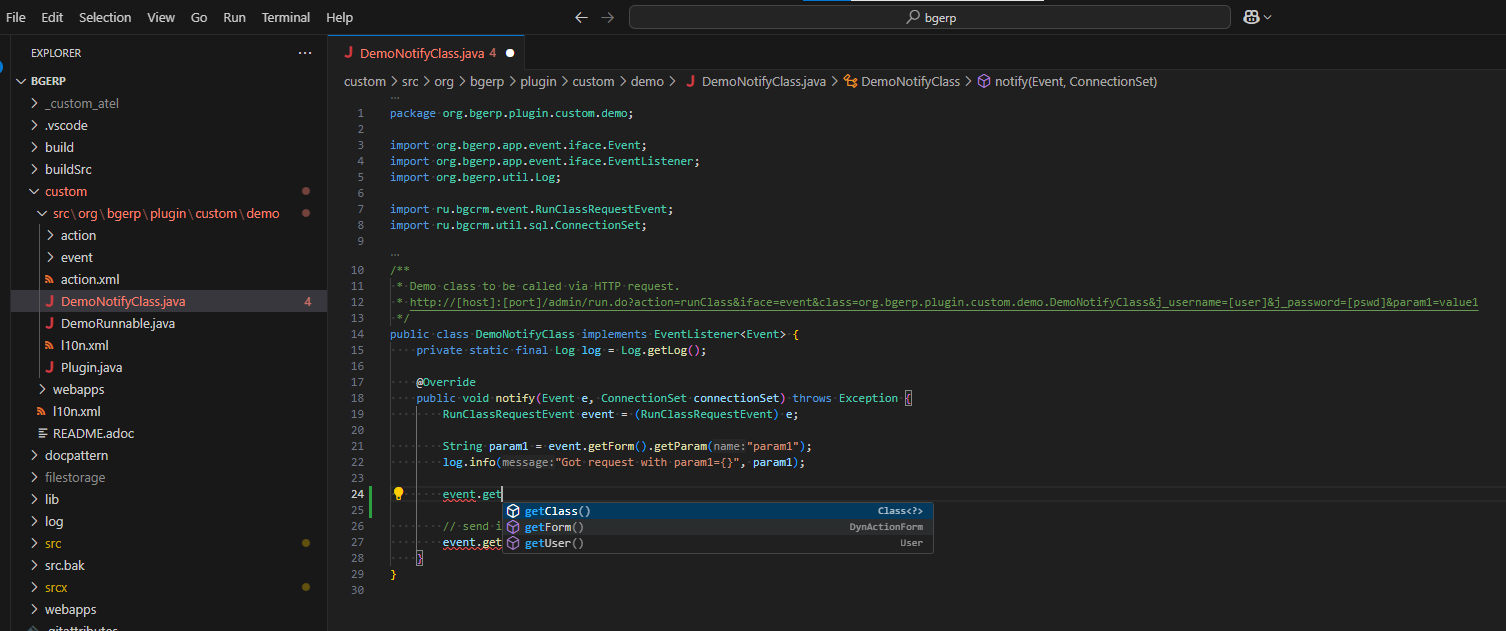
After modification the changed files have to be copied to custom directory of the running server. For version control of a Custom, can be used GIT system.
Not currently used custom directories in project can be renamed with underscore prefix, like _custom_atel on the screen above |
Localization
In file custom/l10n.xml has a special meaning for localization system, it allows to re-define each localized string in the system.
Java Libraries
Additional third-party Java libraries, used in Custom solutions, must be stored in lib/custom directory, as JAR files in lib/ext are overwritten during libraries update.
GIT
Storing custom sources in a GIT repository allows you to track all made changes and always have backup copy of your work.

Repository
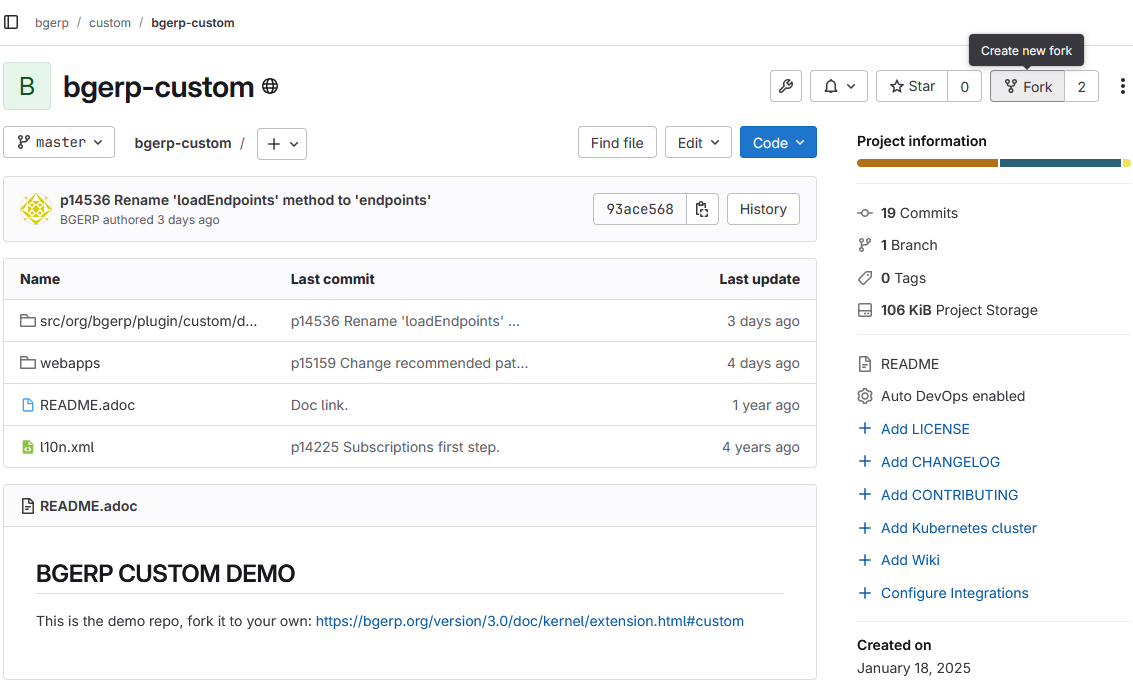
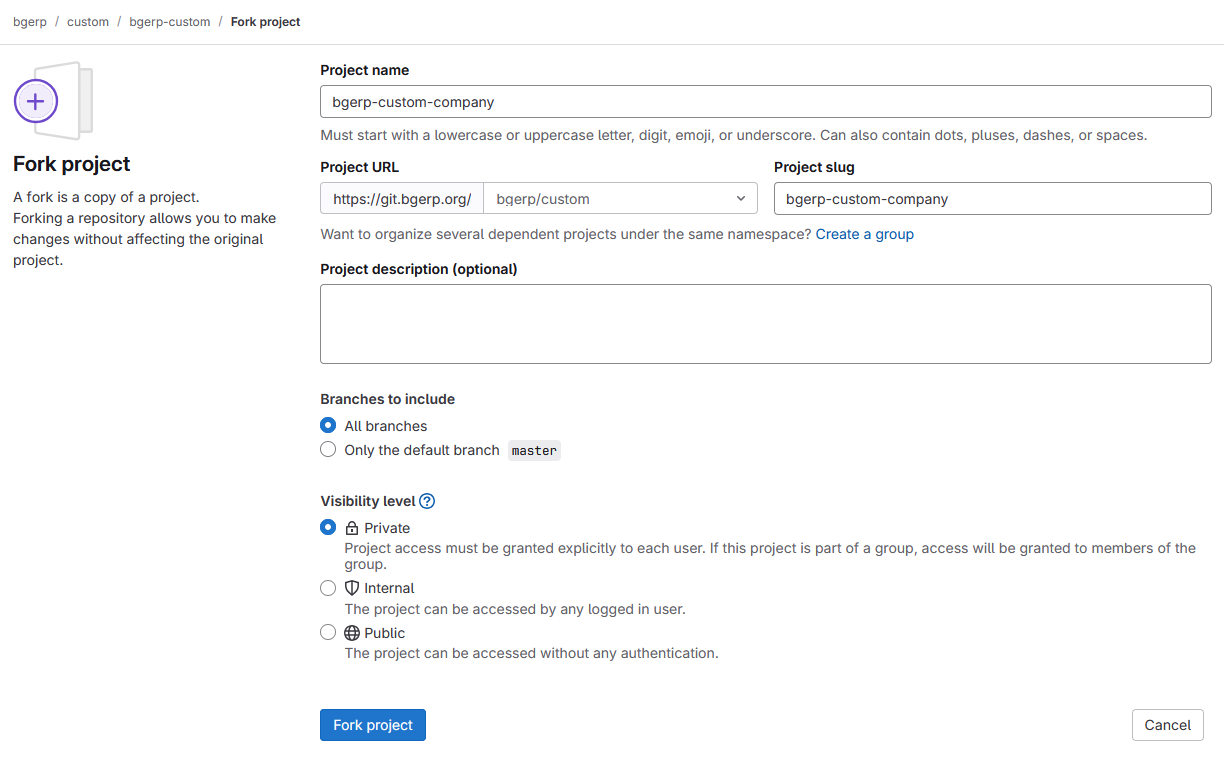
In order to store your custom code you have to create a GIT repository and add there permissions of developers, who do you trust. We offer for our Subscribers free hosting of their Custom GIT on our GitLab server. Please, contact your Consultant for creating your GitLab accounts and making such a fork of https://git.bgerp.org/bgerp/custom/bgerp-custom
Workflow
Use bgerp-custom-<YOUR_COMPANY_NAME> instead of bgerp-custom-company.
IDE
Content of the custom directory may be stored using GIT and developed in full-featured IDE. First you have to check the BGERP project out from GitHub. After make it recognized and compiled in one of supported IDE.
The custom directory has to be checked out inside of the project directory independently.
git clone https://git.bgerp.org/bgerp/custom/bgerp-custom-company.git BGEPR/custom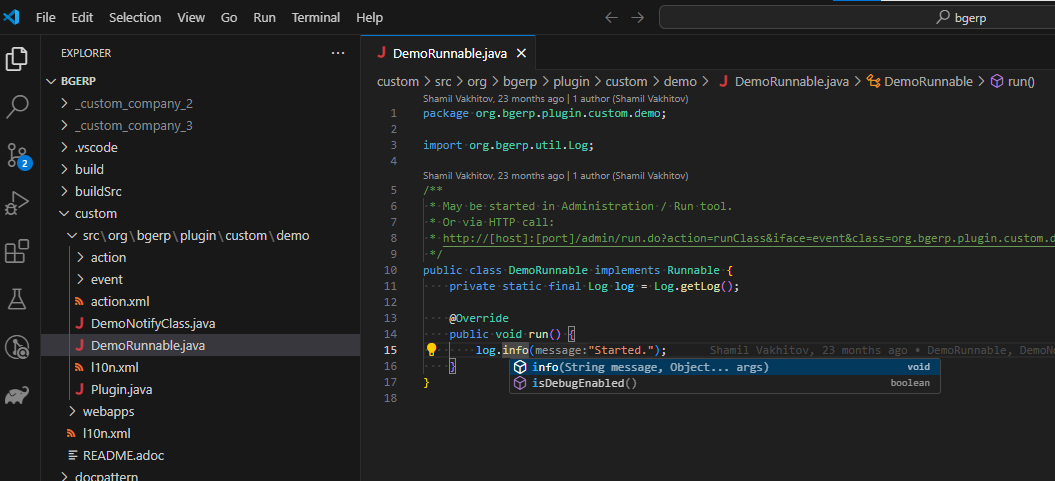
The HTTPS GIT URL can be taken from GitLab UI.
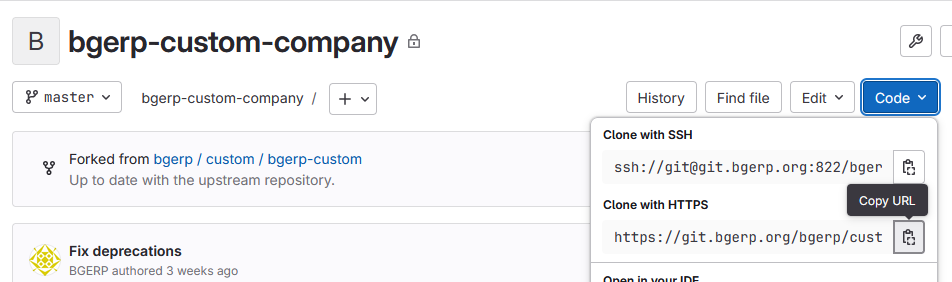
Once you did changes, run the commands for pushing them in custom directory.
git add . && git commit -m "My changes in IDE Custom" && git pushAfter pull the changes in custom directory of app.
git pull --rebaseThe easiest workflow, described above, uses only a singe master branch. But you can also use the same GIT workflow as for the main project’s code. Any change there is placed to a separated branch.
Be sure that the latest changes from your bgerp/custom directory are pushed to the GIT repository. |
App
You have to upload your Public key here. Typically you can find the Linux user’s SSH key in file ~/.ssh/id_(rsa|ed25519|ecdsa).pub Case there is none exists yet, generate it.
The SSH GIT URL, allowing to use key authentication in console can be taken from GitLab UI.
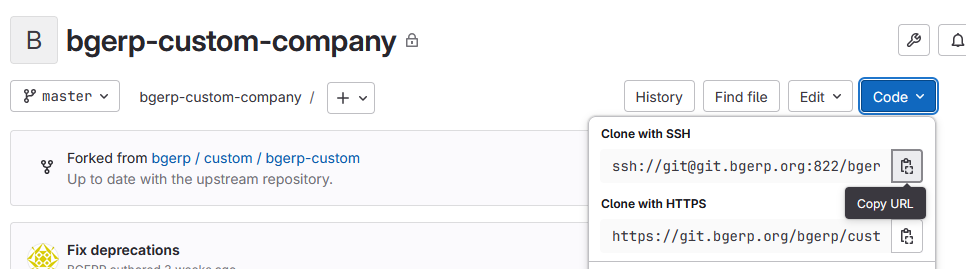
Here is the example of clone command with SSH GIT URL has to be run in application directory.
git clone ssh://git@git.bgerp.org:822/bgerp/custom/bgerp-custom-company.git /opt/bgerp/customUse plugin GIT for updating the Custom code, changed in IDE.

HTTP API
All data modification requests return results in JSON format. Data retrieval requests can provide also HTML, however, it is also possible to retrieve data in JSON format by adding the responseType=json parameter to the request.
For transparent authorization of a third-party system request, the username and password can be passed in the request as HTTP parameters j_username and j_password, respectively. The authToSession=0 parameter in the request indicates that an HTTP session is not required. It is highly recommended to use this parameter when requesting external systems, as preventing the creation of HTTP sessions saves BGERP memory.
An example of a request to retrieve data from an external system in JSON format (selected by process queue):
https://demo.bgerp.org/user/process/queue.do?method=queueShow&id=1&openClose=open&j_username=admin&j_password=admin&responseType=json&authToSession=0
To study the format of requests and responses, you can use the browser’s developer tool to track requests sent by the browser while the user is working in the system. Another sample for retrieving user list. Notice the request parameter page.pageIndex=-1 for disabling pagination.
https://demo.bgerp.org/admin/user.do?method=userList&j_username=admin&j_password=admin&responseType=json&authToSession=0&page.pageIndex=-1
For complex data reading Plugin DBA with SQL queries is recommend you to use, an example:
https://demo.bgerp.org/admin/plugin/dba/query.do?query=SELECT%20id,%20title%20FROM%20user&j_username=admin&j_password=admin&responseType=json&authToSession=0&page.pageIndex=-1
Java Execution
All the examples can use both classes within the application and Custom.
Server Startup
Keys runOnStart and createOnStart in configuration contain comma-separated classes, created and running (such classes must implement java.lang.Runnable interface) or just created on the application startup.
HTTP Request
<SERVER>/admin/run.do?method=runClass&iface=<IFACE>&class=<CLASS_NAME>&j_username=<USER>&j_password=<PSWD>¶m1=value¶m2=..
Где:
-
<SERVER> - host and port of the server;
-
<CLASS_NAME> - Java class name;
-
<USER> and <PSWD> - application users' login and password, as for API calls;
-
<IFACE> - handler class type, more details below.
If the <IFACE> parameter is set to event, the class must implement the org.bgerp.app.event.iface.EventListener interface, to which the ru.bgcrm.event.RunClassRequestEvent event is passed. Otherwise, the class can implement the java.lang.Runnable interface, which will simply be run.
Command Line
To run the class in the context of a running server, execute:
./erp.sh "runclass <CLASS_NAME>"Where <CLASS_NAME> is the fully specified Java class name implementing java.lang.Runnable.
Running in the server context means the class will be executed in a separate thread within the server application, with access to the database connection, configurations, and other context objects. The results can be output to logs.
Scheduler
Use Scheduler to run periodic tasks.